MIDI · VST3 · WINDOWS · FL STUDIO
Generate Basslines That Actually Inspire.
Bassline Generator creates bassline melodies inside FL Studio on Windows, feeding MIDI directly into your selected synth while keeping control over density, variation, gate, and swing.
Generate bassline patterns in FL Studio, route them into your synth, and shape the feel with 4 focused controls.

What It Does
Ideas, Not Random Notes.
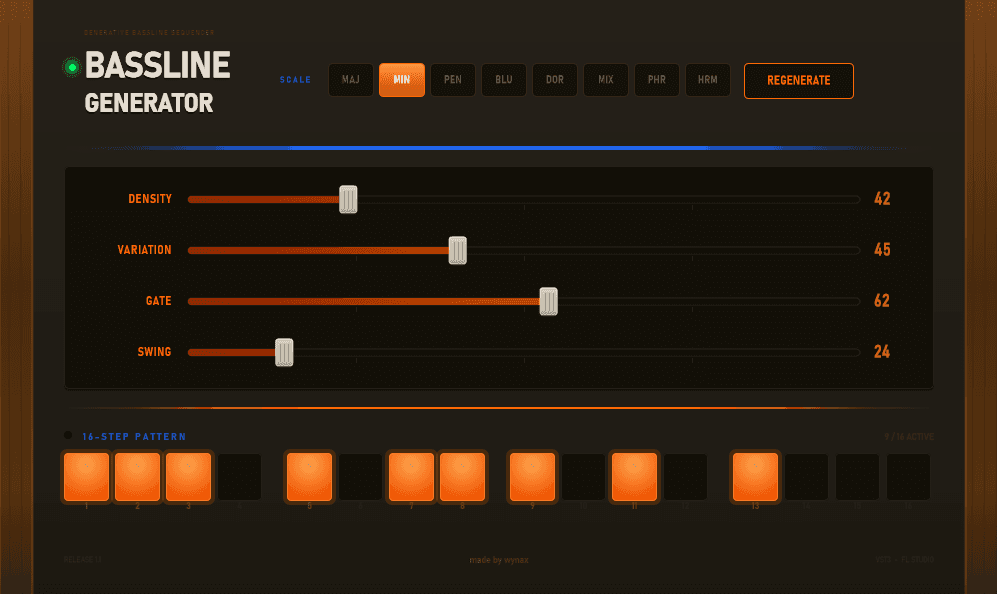
Bassline Generator is a Windows VST3 MIDI plugin for FL Studio that sends musical bassline melodies into your selected synth. Producers can shape each idea with density, variation, gate, and swing. It helps you find usable ideas faster without taking control away from the session.
Control scale, density, variation, gate, and swing
Piano roll to control length and root note
Demo
Watch Bassline Generator build musical ideas in seconds.
Bassline Generator product walkthrough
Feature Set
Focused controls for generating FL Studio basslines that fit your synth.
Root note and length
Place a note in the plugin piano roll to define the bassline’s root note and how long the generated pattern should be.
Scale selection
Choose the musical scale so generated melodies stay locked to the key of your track.
Density
Control how many notes appear in the phrase, from sparse pulses to more active movement.
Variation
Adjust how much the generated bassline changes between ideas while keeping the same musical context.
Gate
Shape note length for short plucks, longer held notes, and tighter rhythmic space.
Swing
Add groove and timing feel so generated patterns sit less rigidly against the drums.
Generate variations
Regenerate new MIDI bassline ideas until the pattern feels right for the track.
Inputs to your synth
Route Bassline Generator into your selected synth inside FL Studio, then design the sound with your own instrument.
From a single root note to a playable bassline.
Bassline Generator sends MIDI into the synth you choose inside FL Studio on Windows. Place a note in the plugin’s piano roll to define the root and length, then choose the scale and shape the result with density, variation, gate, and swing before generating new bassline ideas.
1
Place a root note
Draw a note in the plugin piano roll. That note sets the root and length of the generated bassline.
2
Choose the scale and feel
Select the scale, then adjust density, variation, gate, and swing to shape the musical behavior.
3
Generate into your synth
Generate different MIDI basslines and send them into your selected synth inside FL Studio.
Built by a Producer.
Every iWYNAX plugin is developed from real production workflows—not marketing checklists. Bassline Generator was created to solve a problem every producer experiences: staring at an empty piano roll waiting for inspiration. The goal isn’t to replace creativity, but to help creativity happen faster.
Bassline Generator
$10
A focused MIDI melody generator for FL Studio producers on Windows.
Buy Now
Current release details
• Instant plugin download
• Free updates for the current release line
• Email support
• Secure checkout setup ready
Compatibility
Windows only · FL Studio only · VST3 plugin
How it works
Bassline Generator inputs MIDI melody into your selected synth. It does not export separate MIDI files in the current version.
Questions before you buy?
Which DAWs are supported? For now, Bassline Generator is built for FL Studio on Windows.
Is this a VST3? Yes. Bassline Generator is currently provided as a VST3 plugin for Windows.
Does it work on Mac? Not yet. macOS support is planned, but the current version is Windows only.
Can I export MIDI files? Not currently. Bassline Generator inputs a generated MIDI melody into the synth you choose rather than exporting separate MIDI files.
Do I need internet after activation? Internet is only needed for account and license actions, not for everyday writing sessions.
How do updates work? Updates will be delivered through your iWYNAX account as new versions become available.